CI/CD - ACR interactions
ACR interactions in the automated CI/CD pipeline
Background
Originally, the Container Registry we used was AWS ECR. Recently, due to management’s decision to move away from AWS, a migration task from AWS ECR to Azure ACR was created.
This was a good opportunity to document the process as I prepared ACR to work with our CI/CD, which is what this post is about.
There are a total of 4 players / entities in play with CI:
- GitHub Runner → VM
- GitHub OIDC Provider → Independent Server
- Entra ID (Azure IAM) → Independent Server
- ACR → Independent Service
And a total of 4 players / entities in play with CD:
- EKS → k8s
- EKS OIDC Provider → Independent Service inside EKS
- Entra ID (Azure IAM) → Independent Server
- ACR → Independent Service
I believe most of the ‘players’ in this CI/CD tango are straightforward, but I had to look up ‘GitHub Runner’, so here is my take.
GitHub Runner
TL;DR VM from a pre-provisioned pool from Azure
In order for any compute process to occur in the cloud, it requires a VM. Since there are lots of users that utilize GitHub services, Azure keeps a “warm pool” of VMs. Note that this pre-provisioned pool is maintained by Azure with the latest updates and frequently used tools (i.e. Azure CLI, AWS CLI, etc.).
Other factors that might be useful to know if using the ubuntu-latest option (which +90% of users are using):
- hard isolated
- ephemeral
- given root access
- (on avg) 2 vCPUs and 8GB RAM
CI
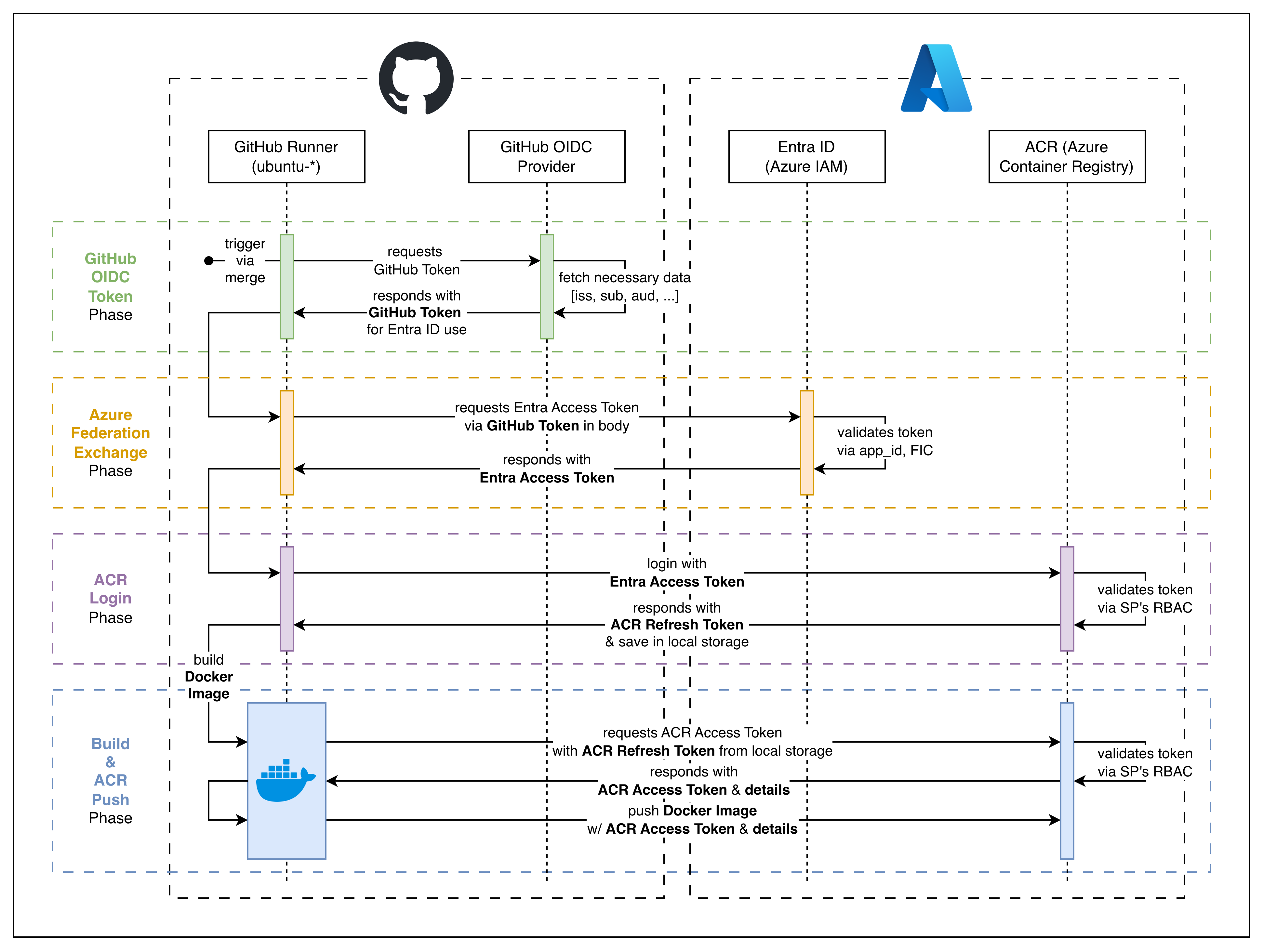 CI flow: GitHub Runner → Entra ID → ACR
1. GitHub OIDC Token
by utilizing azure/login, GitHub Runner calls upon the GitHub OIDC server for a GitHub Token, which would look like the format
1
2
3
4
5
6
7
8
{
  "iss": "https://token.actions.githubusercontent.com",
  "sub": "repo:{ORG}/{REPO_NAME}:environment:{ENV_NAME}",
  "aud": "...",
  "exp": "...",
  "iat": "..."
  // ...additional metadata
}
this token is used to interact with Entra ID
2. Azure Federation Exchange
with the GitHub Token, it’ll use the provided GitHub variables (or secrets) to get a token from the Entra ID server. The request body will consist of
1
2
3
4
5
6
7
{
  "client_id": "...",
  "client_assertion": "{GITHUB_TOKEN}",
  "client_assertion_type": "...",
  "grant_type": "...",
  "scope": "..."
}
the Entra ID server will check if the given values are valid, and if all checks out, it’ll return an Entra Access Token (aka legacy AAD - Azure Active Directory)
1
2
3
4
5
6
{
  "token_type": "Bearer",
  "expires_in": "...",
  "ext_expires_in": "...",
  "access_token": "{ENTRA_ACCESS_TOKEN}"
}
1
2
3
4
5
6
7
8
9
10
{
  "aud": "https://management.azure.com/",
  "iss": "https://sts.windows.net/{TENANT_ID}/",
  "appid": "...",
  "oid": "...",
  "tid": "...",
  "exp": "...",
  "iat": "..."
  // ...additional fields
}
3. ACR Login
with the Entra Access Token, the GitHub Runner can now connect to the corresponding ACR. The request body will consist of
1
2
3
4
5
{
  "grant_type": "access_token",
  "service": "...",
  "access_token": "{ENTRA_ACCESS_TOKEN}"
}
if all checks out in the ACR service, it’ll return an ACR Refresh Token
1
2
3
{
  "refresh_token": "{ACR_REFRESH_TOKEN}"
}
Unlike other tokens which are held in memory, the ACR Refresh Token is saved locally in ~/.docker/config.json so that the Docker Client can use it to get the ACR Access Token for further operations.
1
2
3
4
5
6
7
{
  "auths": {
    "{CONTAINER_REGISTRY}": {
      "auth": "..."
    }
  }
}
4. ACR Push
with the ACR Refresh Token in local storage, the Runner requests an ACR Access Token from ACR to use for the push operation (works like a handshake)
CD
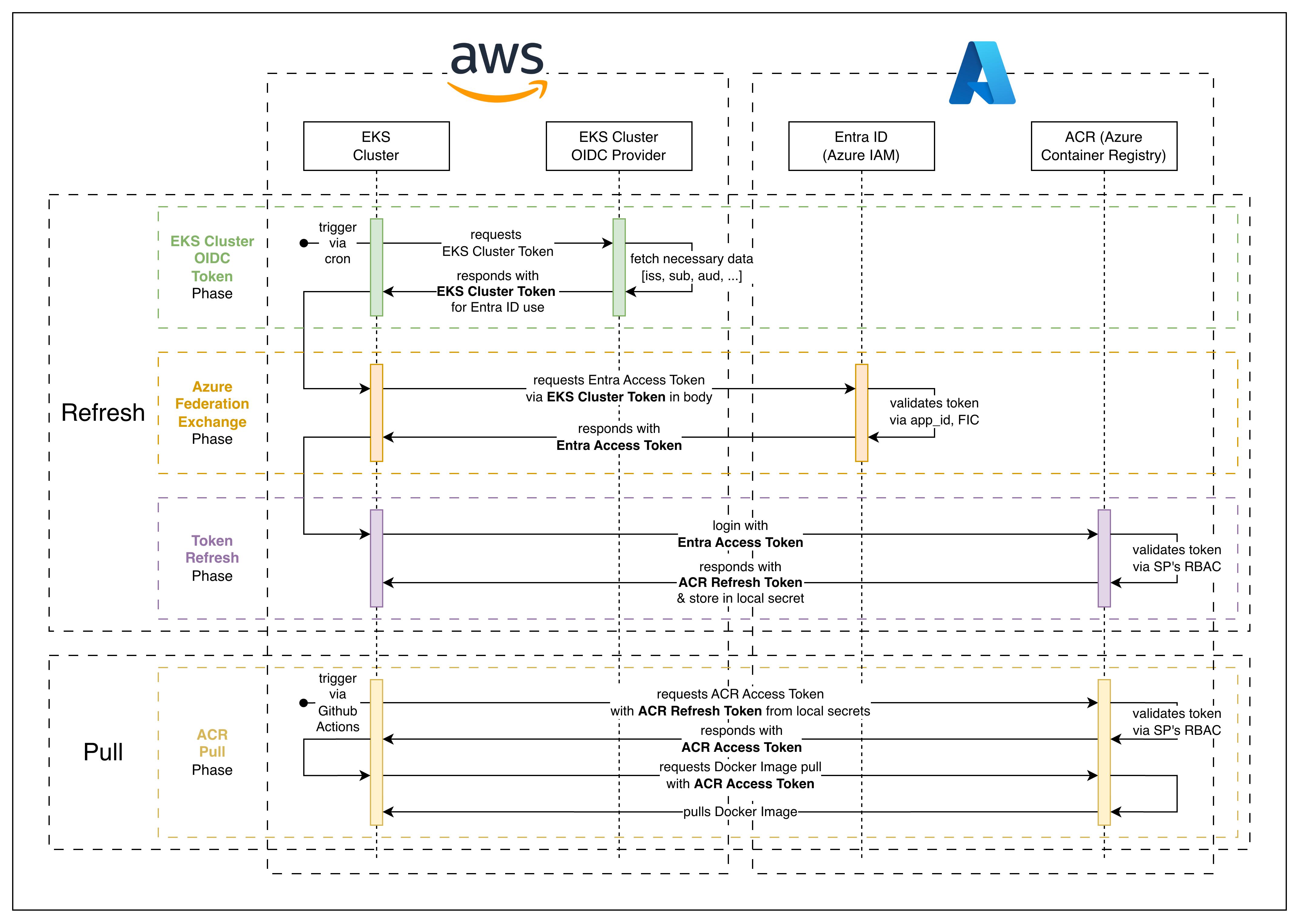 CD flow: EKS → Entra ID → ACR
- this flow is for an automated refresh token → for a simpler version, an SP secret can be used to retrieve the ACR Access Token
- the ‘Refresh’ and ‘Pull’ processes are independent and have no effect on each other
1. EKS Cluster OIDC Token
generates EKS Cluster Token
1
2
3
4
5
6
7
8
{
  "iss": "https://oidc.eks.{REGION}.amazonaws.com/id/{CLUSTER_HASH}",
  "sub": "system:serviceaccount:{NAMESPACE}:{SA_NAME}",
  "aud": ["api://AzureADTokenExchange"],
  "exp": "...",
  "iat": "..."
  // ...additional metadata
}
2. Azure Federation Exchange
with the EKS Cluster Token, it’ll use the k8s-stored variables (or secrets) to get a token from the Entra ID server. The request body will consist of
1
2
3
4
5
6
7
{
  "client_id": "...",
  "client_assertion": "{EKS_CLUSTER_TOKEN}",
  "client_assertion_type": "...",
  "grant_type": "...",
  "scope": "..."
}
the Entra ID server will check if the given values are valid, and if all checks out, it’ll return an Entra Access Token
1
2
3
4
5
6
{
  "token_type": "Bearer",
  "expires_in": "...",
  "ext_expires_in": "...",
  "access_token": "{ENTRA_ACCESS_TOKEN}"
}
1
2
3
4
5
6
7
8
9
10
{
  "aud": "https://management.azure.com/",
  "iss": "https://sts.windows.net/{TENANT_ID}/",
  "appid": "...",
  "oid": "...",
  "tid": "...",
  "exp": "...",
  "iat": "..."
  // ...additional fields
}
3. Token Refresh
with the Entra Access Token, the EKS Cluster can now connect to the corresponding ACR. The request body will consist of
1
2
3
4
5
{
  "grant_type": "access_token",
  "service": "...",
  "access_token": "{ENTRA_ACCESS_TOKEN}"
}
if all checks out in the ACR service, it’ll return an ACR Refresh Token
1
2
3
{
  "refresh_token": "{ACR_REFRESH_TOKEN}"
}
the ACR Refresh Token is saved in a k8s secret so that later, during the ‘Pull’ process, it can be used to obtain an ACR Access Token for the ACR pull operation.
4. ACR Pull
- in an automated CI/CD with GitHub Actions, the workflow will trigger the CD to pull a new image with a designated tag
- before the actual pull, the EKS Cluster will retrieve a valid ACR Access Token using the ACR Refresh Token saved in the k8s secret